Every tool we build, one product

The Bedrock Toolbox.

Your whole office for $100 a month.

We're trained to make businesses and the trades more efficient. We take modern solutions and apply them to your business.

What you're actually buying

Modern software, engineered for contractors.

The Bedrock Toolbox is the office side of your business, handled. We take the software big companies pay serious money for, operations, your crew's hours, marketing, and your numbers, and build it for the way contractors actually work. It's one system, not six subscriptions that don't talk to each other, so the hours you'd burn on paperwork go back into the work that pays. Your time and your money come first; everything in here exists to save you both.

Operations

The paperwork gets done without you sitting at a desk to do it. Donna drafts the bids, invoices, and receipts; you approve and get back to the job.

Why it matters
16 hrs
a week spent on admin by the average owner
CoAdvantage small-business research
See what it does →
Team Hours

Your crew clocks in and out from their own phone. No paper, no “I think I worked eight,” no crews clocking each other in. Hours add up by day and by job, ready for payroll.

Why it matters
75%
of U.S. businesses get hit by “buddy punching”
American Payroll Association
See what it does →
Marketing

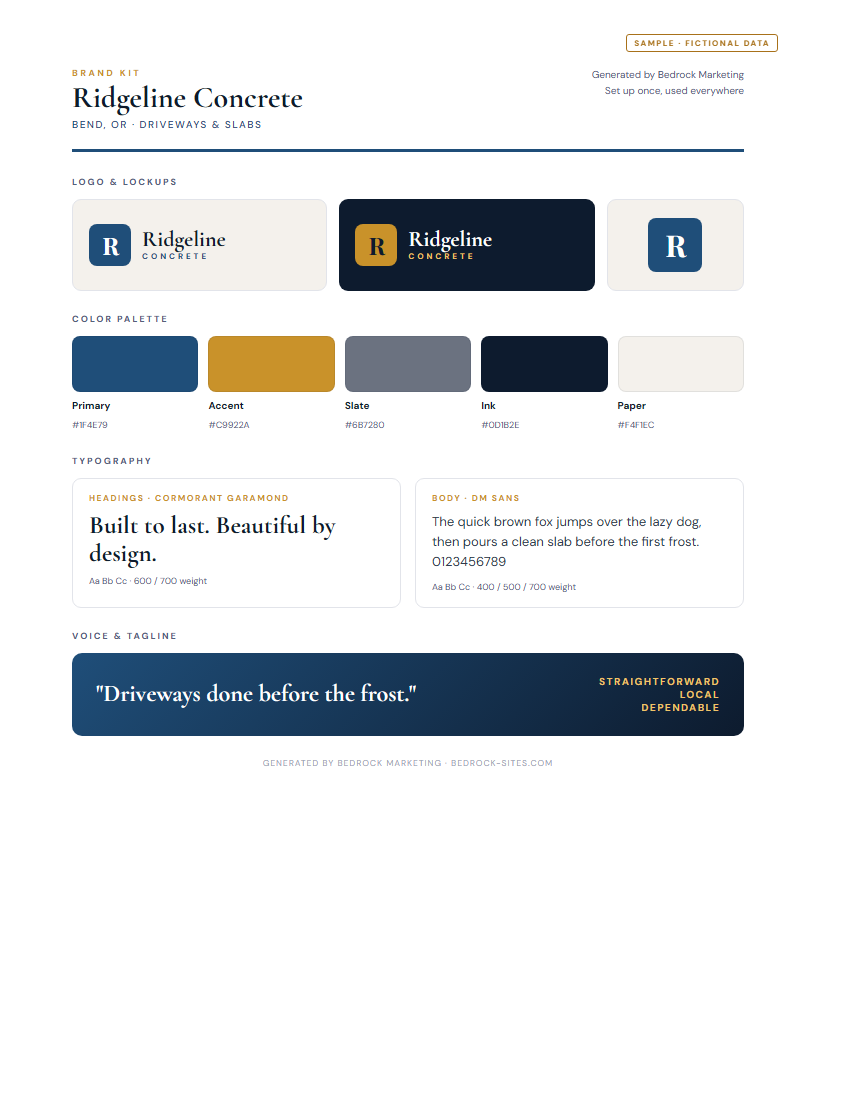
Looking established wins jobs before you ever pick up the phone. One Brand Kit, and every flyer, post, and sign comes out matching.

Why it matters
+23%
revenue lift from consistent branding
Lucidpress / Demand Metric study
See what it does →
Finance

You can't fix what you can't see. Know your margins, what you're owed, and which jobs actually made money, before any of it bites.

Why it matters
82%
of small-business failures involve cash flow
U.S. Bank study
See what it does →

The big outfits already run on tools like these. The Toolbox is how the small business keeps up, no big-company budget required.

What's inside

One Toolbox. Four jobs it does for you.

Not four apps, one connected system. Click into each tool to see exactly what it does, what it doesn't, and what it looks like inside. Every one is free to try.

Run the office

Operations · Donna

Bids, bills, and invoices, automated by Donna, your admin assistant in Bedrock.

Works with QuickBooks Online Gmail
What it doesClick to learn more
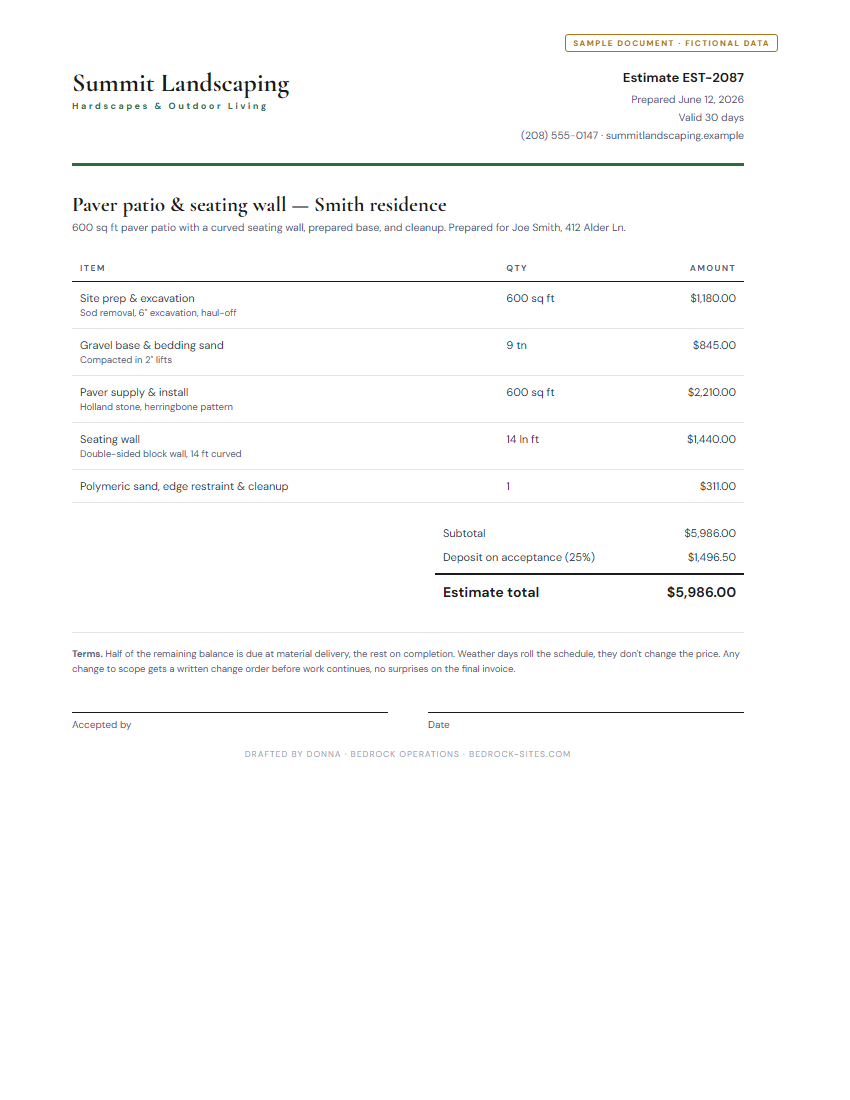
  • Drafts priced estimates from a plain job description
  • Turns an approved estimate into an invoice
  • Reads receipts from a photo and files them
  • Saves customers and starts a project folder for each
  • Your crew clocks in from their own app; hours add up by job, ready for payroll (see Team Hours)
  • Schedules jobs and drafts customer reminders
  • Syncs estimates, invoices, and expenses to QuickBooks
  • Learns your labor rate, markup, and standard fees
What it does not doClick to learn more
  • Send anything to a customer without your approval
  • File taxes or replace your accountant
  • Give legal, tax, or financial advice
  • Move money or touch your bank account
  • Run payroll
  • Make the final call on your pricing
Example workflowClick to learn more
  1. Mike finishes a paver patio and tells Donna: "Invoice Joe Smith for the patio job."
  2. Donna pulls the approved estimate and drafts the invoice, Net 30, line items already filled in.
  3. Mike reads it over and taps Approve.
  4. Donna emails it to Joe from Mike's address and logs it in QuickBooks. Start to finish: about 30 seconds.
The paperwork behind the numbers, a bid Donna drafts
A sample estimate PDF drafted by Donna (fictional Summit Landscaping data) Open the sample bid (PDF)
One thing to know

You approve everything. Donna drafts, she never sends an estimate, invoice, email, or calendar invite on her own. Every action waits for your review. Donna can make mistakes, so the final check is always yours.

Common questions
Will Donna send something to a customer without asking?

No. Every estimate, invoice, email, or calendar event waits for your approval. Donna drafts; you decide what goes out. That's non-negotiable.

Does Donna work without QuickBooks connected?

Yes. Donna saves everything in your Bedrock workspace whether or not you connect QuickBooks. Connecting QBO just keeps the two in sync automatically.

What if Donna gets a number or a line item wrong?

You catch it in the approval panel and tweak it before approving. Donna learns your typical rate, markup, and standard fees over time, so wrong guesses get rarer.

Can I use Donna without an accounting background?

That's the whole point. No journal entries, no debits and credits, Donna handles estimates, invoices, receipts, and job tracking in plain language.

Keep your crew's hours straight

Team Hours

Your crew clocks in and out from their own free app. Lunch and breaks, hours by job, labor cost, it all adds up on its own and lands in your dashboard, ready for payroll. No more hours scribbled on a napkin.

Part of The Bedrock Toolbox Works on any phone
What it doesClick to learn more
  • Your crew clocks in and out from their own free app, no extra app to buy
  • Tracks lunch and breaks
  • Sorts hours by job, so you see labor cost per job
  • Adds up the hours automatically, ready for payroll
  • Fix a missed punch in a tap; every edit is logged
  • Works on any phone, installs like an app
What it does not doClick to learn more
  • Run payroll or cut checks, it hands clean hours to whoever does
  • Track your crew's GPS or location
  • Cost extra, it's part of the Toolbox
Example workflowClick to learn more
  1. You send each crew member a join link; they add the clock to their phone in a tap.
  2. On site, they pick the job and hit Clock In, lunch and breaks included.
  3. Hours roll up by job in your dashboard, with the labor cost already figured.
  4. Come payday, you hand off clean hours, no spreadsheet, no guessing.
What your crew sees, clock in from their phone
Team Hours On the clock
Smith · paver patio
3:42
on this job today
Clock Out
This week
Mon · Smith8.0h
Tue · Walker7.5h
Wed · Lee6.0h
Synced to your dashboard
One thing to know

It's a time record, not a payroll service. Team Hours tracks the hours and the labor cost; you (or your payroll provider) cut the checks. Clean hours, handed off ready.

Common questions
Does my crew have to pay for an app?

No. Each crew member gets a free clock-in app on their own phone, nothing to buy. Team Hours is part of the Toolbox.

Does Bedrock run payroll?

No. Bedrock keeps the time record and figures the labor cost. It hands you clean hours, ready for you or your payroll provider to run.

What if someone forgets to clock out?

You can fix a missed or wrong punch in a tap from your dashboard. Every edit is logged so the record stays honest.

Know your numbers

Finance · Analytics

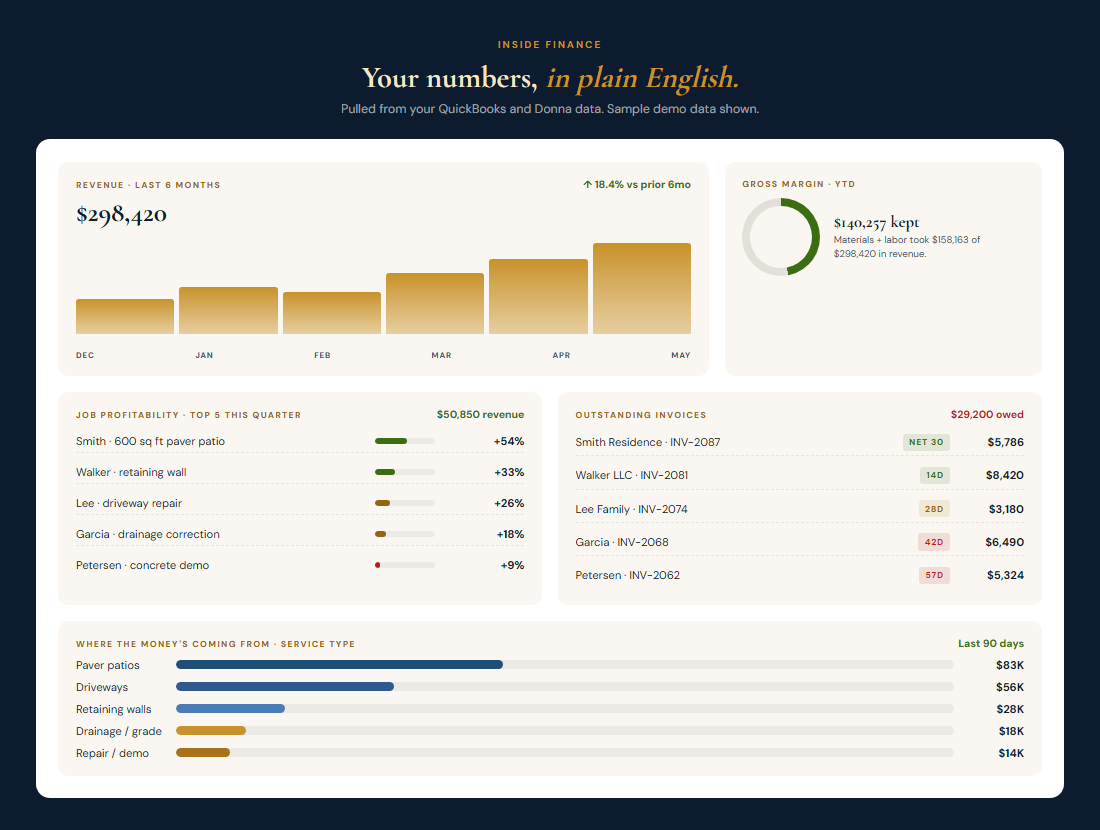
Plain-English numbers: margins, cash flow, what each job earned, and the money you're still owed.

Works with QuickBooks Online Shares Donna's connection
What it doesClick to learn more
  • Shows revenue, margin, and expense trends in clear charts
  • Tracks every invoice, paid, outstanding, and overdue
  • Lists the estimates you've sent and where each stands
  • Ranks jobs by profitability so you see what actually paid
  • Filters by time period, service type, and margin
  • Pulls straight from QuickBooks, no manual entry
What it does not doClick to learn more
  • Replace QuickBooks or your accountant
  • Do bookkeeping, reconciliation, or tax filing
  • Send invoices or estimates, that's Donna's job
  • Give financial or tax advice
  • Handle payroll or connect to your bank
  • Let you edit numbers, it's read-only by design
Example workflowClick to learn more
  1. End of the month, Sarah opens Finance. Graphs page: revenue's up, margin holding at 47%.
  2. Statements page: two invoices are overdue, she sees exactly who owes her and how much.
  3. Projects page: the retaining-wall job ran a thin 26% margin while patios cleared 54%.
  4. Next time she bids a wall, she prices it right. No spreadsheets, no guessing.
What Finance looks like, demo data
The Bedrock Finance dashboard with revenue trend, gross margin, job profitability, outstanding invoices, and service-type breakdown (demo data)
One thing to know

Estimates, not official books. Finance is read-only and built for a quick gut check. Margins are estimates based on available data, this is not official financial reporting. For taxes and statements, that's still your accountant.

Common questions
Do I need QuickBooks to use Finance?

QuickBooks gives you the richest picture, but Finance also works on Donna data alone, every estimate, invoice, and receipt you approve in Donna feeds the dashboard.

Will Finance replace my accountant?

No. Finance is a visibility layer, read-only dashboards in plain English. It never touches your tax filing, payroll, or official statements. Keep your accountant.

How accurate are the margins?

They're labeled estimates. Job costs come from your QuickBooks expenses and Donna's line items; both are as accurate as what you put in. Finance is honest about what it doesn't know.

Can I export the reports?

Print and PDF export are on the roadmap. For now, the dashboard is live in your browser and refreshes from QuickBooks on a 15-minute cache.

Get found & look professionalLive Now

Marketing

Creates your personal brand kit, then turns your job photos into on-brand flyers, posts, and signs in minutes.

Works with Shared Business Profile Brand Kit
What it doesClick to learn more
  • Brand Kit setup once, every piece comes out on-brand
  • 8 material types: flyers, social, door hangers, signs, cards
  • Writes your headline and copy in your voice
  • 3 layouts, applied to your brand automatically
  • Download as PNG, JPG, or PDF, print or post anywhere
  • Pulls your business info from the shared profile
What it does not doClick to learn more
  • Print or mail the materials for you
  • Run or pay for your ad campaigns
  • Post to your social accounts on a schedule
  • Design a brand-new logo from scratch
  • Guarantee leads, it makes the materials, you run them
Example workflowClick to learn more
  1. Maria sets up her Brand Kit once, colors, logo, the voice her business speaks in.
  2. She picks "door hanger," drops in two job photos, and taps generate.
  3. Marketing writes the headline in her voice and lays it out on-brand.
  4. She downloads a print-ready PDF and takes it to the print shop. About 5 minutes.
A Brand Kit it generates, colors, type, and logo lockups
A sample brand kit generated by Bedrock Marketing (fictional Ridgeline Concrete data) Open the sample brand kit (PDF)
One thing to know

You're the final eye. Marketing writes a starting headline and lays it out on-brand, but the copy and the details are yours to check. Review every piece before you print it or post it.

Common questions
Do I need design skills?

No. Pick a format, drop in a photo, the layout and typography are already brand-correct. Our software writes the headline and CTA so the copy doesn't sit empty.

Can I use my own logo and brand colors?

Yes, that's what the Brand Kit step is for. Upload your logo, set your colors and tone once, and every material you build uses them.

What if I don't have customer photos yet?

Use stock-ish backgrounds from the built-in palette or your existing job photos. The asset library saves every piece you generate so you can come back to it.

Can I edit the generated copy?

Always. Our software writes a starting headline and CTA in your tone, you edit them right in the preview and the design updates live.

Pricing

One price. Every tool. That's it.

Bedrock Toolbox
$100/mo
or $1,000/yr (2 months free)

Everything on this page: operations, marketing, your numbers, and SEO & GEO. Month to month, cancel anytime, and you don't pay until you're happy with what we've built.

Add your website, $200 setup and free hosting.
Get Bedrock
See full pricing →
More