Every tool we build, one product

The Bedrock Toolbox.

Your whole office for $100 a month.

We're trained to make businesses and the trades more efficient. We take modern solutions and apply them to your business.

What you're actually buying

Modern software, engineered for contractors.

The Bedrock Toolbox is the office side of your business, handled. We take the software big companies pay serious money for, operations, your crew's hours, marketing, and your numbers, and build it for the way contractors actually work. It's one system, not six subscriptions that don't talk to each other, so the hours you'd burn on paperwork go back into the work that pays. Your time and your money come first; everything in here exists to save you both.

Office

Get the paperwork done on the go.

  • Knock out paperwork fast without sitting at a desk.
  • Draft bids, invoices, and receipts by voice or one tap.
  • Donna keeps it organized so nothing slips.
Why it matters
16 hrs
a week spent on admin by the average owner
CoAdvantage small-business research
See what it does →
Crew

Simple, organized timekeeping.

  • Your crew clocks in and out from their own phones.
  • Hours add up by day and by job, ready for payroll.
  • See who's on the clock and what it's costing.
Why it matters
75%
of U.S. businesses get hit by “buddy punching”
American Payroll Association
See what it does →
Marketing

Look established, win more jobs.

  • Set up your Brand Kit once, every piece comes out matching.
  • Turn job photos into flyers, posts, and signs in minutes.
  • Download it print-ready, in your colors and your voice.
Why it matters
+23%
revenue lift from consistent branding
Lucidpress / Demand Metric study
See what it does →
Money

Know where the money's going.

  • Money in, money out, and what's actually profit.
  • See which jobs made money and which didn't.
  • Connects to QuickBooks, or works without it.
Why it matters
82%
of small-business failures involve cash flow
U.S. Bank study
See what it does →

The big outfits already run on tools like these. The Toolbox is how the small business keeps up, no big-company budget required.

What's inside

One Toolbox. Four jobs it does for you.

Not four apps, one connected system. Click into each tool to see exactly what it does, what it doesn't, and what it looks like inside. Every one is free to try.

Office

Donna runs your paperwork.

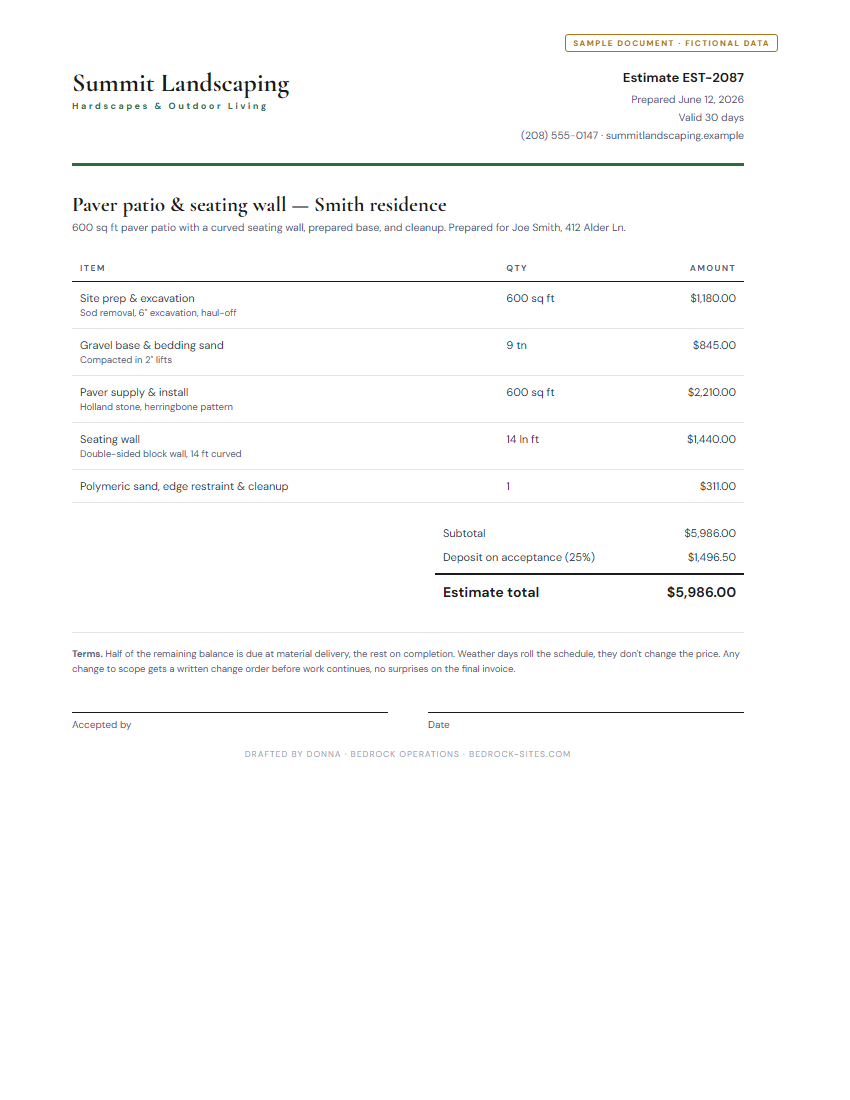
Bids, bills, and invoices, automated by Donna, your admin assistant in Bedrock.

Estimates & invoices Receipts from a photo Job scheduling Customer database
Works with QuickBooks Online Gmail
What it does (and doesn't)Click to learn more
  • Drafts priced estimates from a plain job description
  • Turns an approved estimate into an invoice
  • Reads receipts from a photo and files them
  • Syncs estimates, invoices, and expenses to QuickBooks
  • Learns your labor rate, markup, and standard fees
  • Send anything to a customer without your approval
  • Give legal, tax, or financial advice
  • Move money or touch your bank account
Example workflowClick to learn more

"Invoice Joe Smith for the patio job" and Donna drafts it from the approved estimate. You tap Approve; it emails Joe and logs in QuickBooks. About 30 seconds.

More questions →
The paperwork behind the numbers, a bid Donna drafts
A sample estimate PDF drafted by Donna (fictional Summit Landscaping data) Open the sample bid (PDF)
One thing to know

You approve everything. Donna drafts, she never sends an estimate, invoice, email, or calendar invite on her own. Every action waits for your review. Donna can make mistakes, so the final check is always yours.

Crew

Your crew's hours, straight.

Your crew clocks in and out from their own free app. Lunch and breaks, hours by job, labor cost, it all adds up on its own and lands in your dashboard, ready for payroll. No more hours scribbled on a napkin.

4.5 hrs a week per employee is lost to time theft and "buddy punching" when hours live in someone's notes. Source: American Payroll Association
Free clock-in app for your crew Hours by job Labor cost per job Payroll-ready totals
Part of The Bedrock Toolbox Works on any phone
What it does (and doesn't)Click to learn more
  • Your crew clocks in and out from their own free app, no extra app to buy
  • Sorts hours by job, so you see labor cost per job
  • Adds up the hours automatically, ready for payroll
  • Fix a missed punch in a tap; every edit is logged
  • Run payroll or cut checks, it hands clean hours to whoever does
  • Track your crew's GPS or location
  • Cost extra, it's part of the Toolbox
Example workflowClick to learn more

Your crew taps a join link, picks the job, and hits Clock In. Hours roll up by job in your dashboard, and come payday you hand off clean totals, no spreadsheet, no guessing.

More questions →
What your crew sees, clock in from their phone
Crew On the clock
Smith · paver patio
3:42
on this job today
Clock Out
This week
Mon · Smith8.0h
Tue · Walker7.5h
Wed · Lee6.0h
Synced to your dashboard
One thing to know

It's a time record, not a payroll service. Crew tracks the hours and the labor cost; you (or your payroll provider) cut the checks. Clean hours, handed off ready.

Money

Know your numbers at a glance.

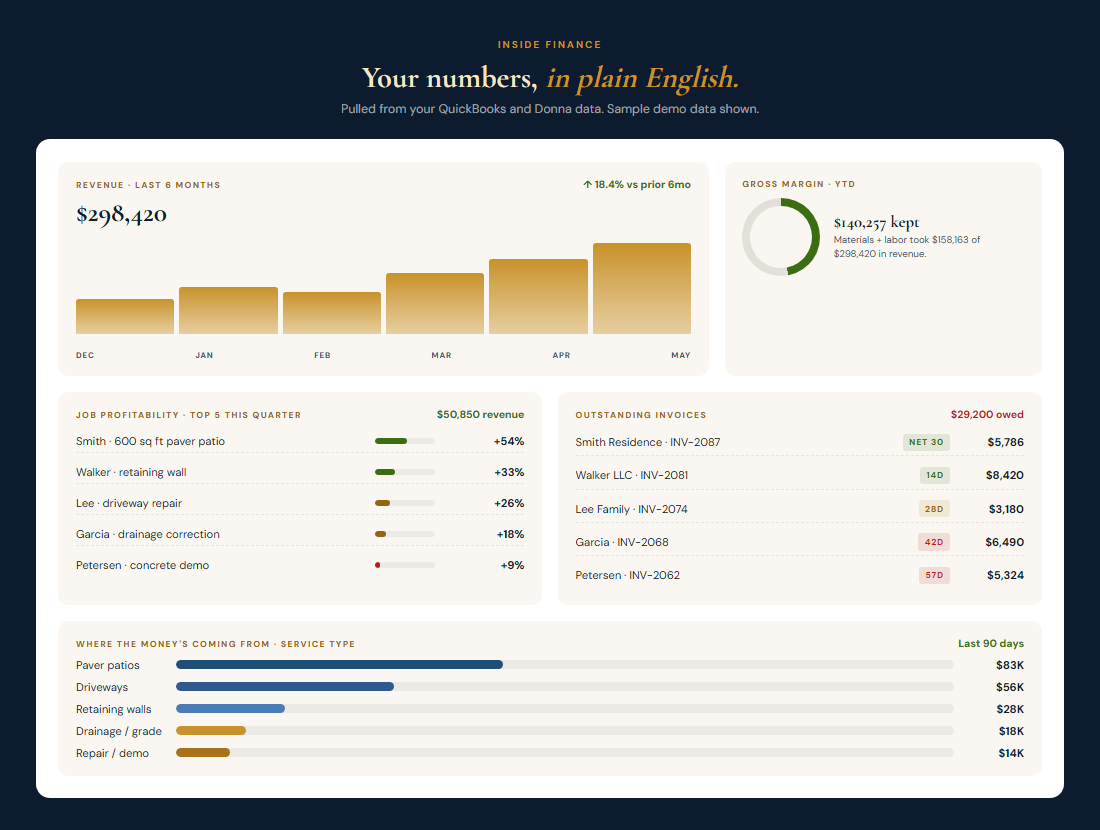
Margins, cash flow, what each job earned, and what you're still owed, all in plain English.

Margins & cash flow What each job earned Invoices & money due, tracked for you
Works with QuickBooks Online Shares Donna's connection
What it does (and doesn't)Click to learn more
  • Shows revenue, margin, and expense trends in clear charts
  • Tracks every invoice, paid, outstanding, and overdue
  • Ranks jobs by profitability so you see what actually paid
  • Pulls straight from QuickBooks, no manual entry
  • Replace QuickBooks or your accountant
  • Give financial or tax advice
  • Handle payroll or connect to your bank
Example workflowClick to learn more

End of the month, Sarah opens Money: two invoices overdue, patios clearing 54% while retaining walls ran a thin 26%. Next wall she bids, she prices it right.

More questions →
What Money looks like, demo data
The Bedrock Money dashboard with revenue trend, gross margin, job profitability, outstanding invoices, and service-type breakdown (demo data)
One thing to know

Estimates, not official books. Money is read-only and built for a quick gut check. Margins are estimates based on available data, this is not official financial reporting. For taxes and statements, that's still your accountant.

MarketingLive Now

Look professional everywhere.

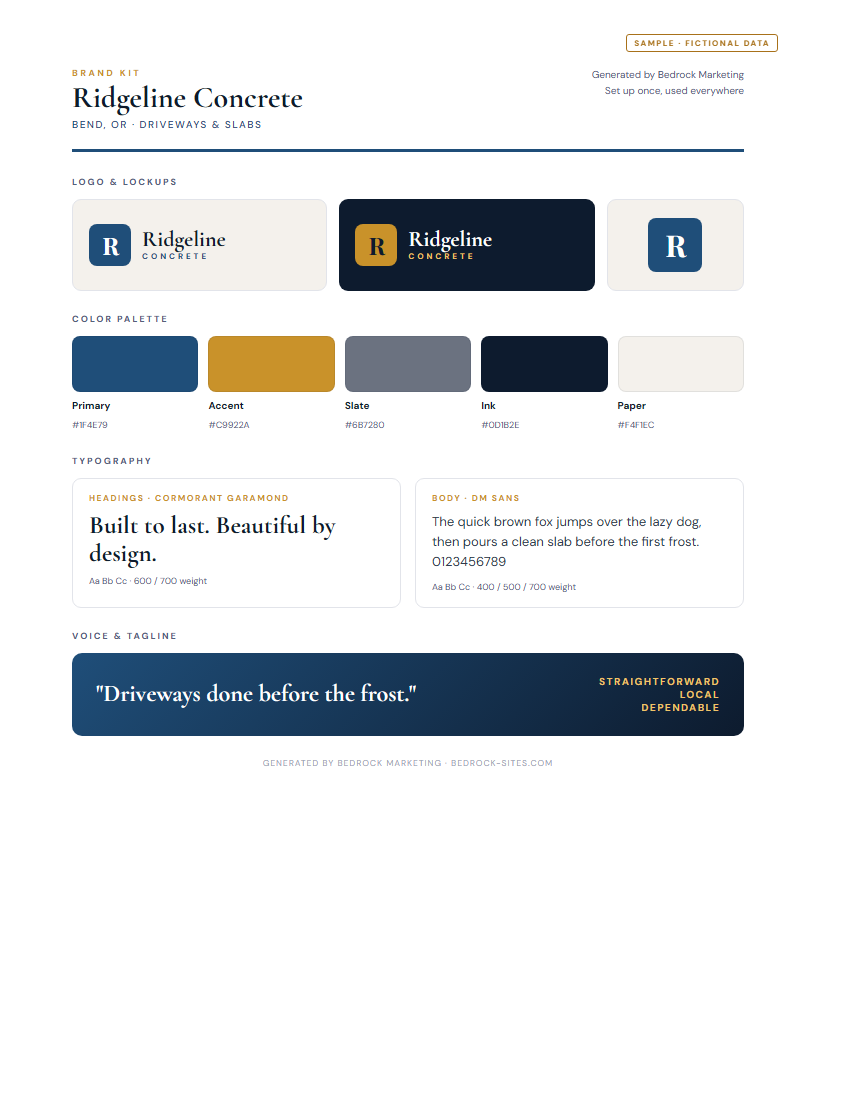
Creates your personal brand kit, then turns your job photos into on-brand flyers, posts, and signs in minutes.

Brand Kit, set up once Upload photos, get social media posts Flyers, signs, door hangers & cards PNG, JPG & PDF export
Works with Shared Business Profile Brand Kit
What it does (and doesn't)Click to learn more
  • Brand Kit setup once, every piece comes out on-brand
  • 8 material types: flyers, social, door hangers, signs, cards
  • Writes your headline and copy in your voice
  • Download as PNG, JPG, or PDF, print or post anywhere
  • Print or mail the materials for you
  • Post to your social accounts on a schedule
  • Guarantee leads, it makes the materials, you run them
Example workflowClick to learn more

Maria picks "door hanger," drops in two job photos, and taps generate. Marketing writes the headline in her voice, lays it out on-brand, and hands her a print-ready PDF. About 5 minutes.

More questions →
A Brand Kit it generates, colors, type, and logo lockups
A sample brand kit generated by Bedrock Marketing (fictional Ridgeline Concrete data) Open the sample brand kit (PDF)
One thing to know

You're the final eye. Marketing writes a starting headline and lays it out on-brand, but the copy and the details are yours to check. Review every piece before you print it or post it.

Questions about the tools

Office
Common questions
Will Donna send something to a customer without asking?

No. Every estimate, invoice, email, or calendar event waits for your approval. Donna drafts; you decide what goes out. That's non-negotiable.

Does Donna work without QuickBooks connected?

Yes. Donna saves everything in your Bedrock workspace whether or not you connect QuickBooks. Connecting QBO just keeps the two in sync automatically.

What if Donna gets a number or a line item wrong?

You catch it in the approval panel and tweak it before approving. Donna learns your typical rate, markup, and standard fees over time, so wrong guesses get rarer.

Can I use Donna without an accounting background?

That's the whole point. No journal entries, no debits and credits, Donna handles estimates, invoices, receipts, and job tracking in plain language.

Crew
Common questions
Does my crew have to pay for an app?

No. Each crew member gets a free clock-in app on their own phone, nothing to buy. Crew is part of the Toolbox.

Does Bedrock run payroll?

No. Bedrock keeps the time record and figures the labor cost. It hands you clean hours, ready for you or your payroll provider to run.

What if someone forgets to clock out?

You can fix a missed or wrong punch in a tap from your dashboard. Every edit is logged so the record stays honest.

Marketing
Common questions
Do I need design skills?

No. Pick a format, drop in a photo, the layout and typography are already brand-correct. Our software writes the headline and CTA so the copy doesn't sit empty.

Can I use my own logo and brand colors?

Yes, that's what the Brand Kit step is for. Upload your logo, set your colors and tone once, and every material you build uses them.

What if I don't have customer photos yet?

Use stock-ish backgrounds from the built-in palette or your existing job photos. The asset library saves every piece you generate so you can come back to it.

Can I edit the generated copy?

Always. Our software writes a starting headline and CTA in your tone, you edit them right in the preview and the design updates live.

Money
Common questions
Do I need QuickBooks to use Money?

QuickBooks gives you the richest picture, but Money also works on Donna data alone, every estimate, invoice, and receipt you approve in Donna feeds the dashboard.

Will Money replace my accountant?

No. Money is a visibility layer, read-only dashboards in plain English. It never touches your tax filing, payroll, or official statements. Keep your accountant.

How accurate are the margins?

They're labeled estimates. Job costs come from your QuickBooks expenses and Donna's line items; both are as accurate as what you put in. Money is honest about what it doesn't know.

Can I export the reports?

Yes. Hit "Print / Save as PDF" at the top of the Money dashboard and your browser prints it or saves a clean PDF. The dashboard itself stays live in your browser and refreshes from QuickBooks on a 15-minute cache.

Pricing

One price. Every tool. That's it.

Bedrock Toolbox
$100/mo
or $1,000/yr (2 months free)

Every tool on this page. Month to month, cancel anytime.

Add your website, $200 setup and free hosting.
Get Bedrock
See full pricing →
More